Imagine you are a tailor in the middle of a busy workday. In your left hand, you are holding a physical tape measure that is wrapped tightly around a client. In your right hand, you have a piece of chalk ready to make a mark. Your shop is buzzing with the sounds of sewing machines, customers talking, and fabrics rustling. Now, somehow, you need to pull out your mobile phone and input "38 and 3/4 inches" into a digital system without dropping your tools or losing your place.
Growing up, I watched my mom navigate this beautiful chaos every single day. Her most critical tool was not her premium sewing machine or her expensive fabric shears. Her most critical tool was her "Measurement Notebook." However, that notebook was incredibly fragile. It was constantly prone to tea spills, hastily scribbled numbers, and frantically flipped pages when a client walked in unexpectedly.
This friction is the exact moment where ninety percent of fashion technology fails. Software engineers often build tools for a quiet office environment, forgetting that tailors work in a highly tactile, physical space. That disconnect is exactly why we built ZikFash.
Enter ZikFash
We are thrilled to introduce ZikFash, a digital workspace built from the ground up exclusively for tailors, fashion designers, and bespoke creators. ZikFash is designed to replace the fragile paper notebook. But it does not just act as a simple database in the cloud. It acts as a system that fundamentally understands the physical workflow of a fashion designer.
The goal of ZikFash is to bridge the gap between traditional craftsmanship and modern technology. Before writing a single line of code for this platform, we spent days researching existing tailoring applications online to see how others had solved this problem. What we found was frustrating, but not exactly surprising.
The Problem with Existing Solutions
Every single solution I tested felt like a glorified spreadsheet disguised as a mobile app. They relied heavily on standard text inputs. These apps essentially forced tailors to stop whatever they were doing, pull up a digital number pad, and manually type out decimals on a tiny screen. If you have a measuring tape around someone's waist, the last thing you want to do is type "32.75" on a glass screen.
But the user experience problems got much worse. The apps lacked even basic anatomical validation. During testing, we typed "1000 inches" for a sleeve length, and the apps cheerfully saved it to the database without a single warning. In the real world, a 1000-inch sleeve does not exist. A bad measurement input in a real shop means ruined expensive fabric, lost time, and lost money.
We quickly realized ZikFash could not just digitize a standard HTML form. We had to build an interface that respected the physical constraints, anatomical realities, and fast-paced workflow of a real tailor shop.
The Technical Deep Dive
To fix this glaring issue, we threw out the standard number keypad entirely. Instead, we engineered a custom 3D Tape Measure Scroll that perfectly mimics the tactile reality of the job.
The Digital Scroll Wheel
Tailors do not think in decimals like 38.75. They think in fractions like 38 and 3/4. We built a custom digital wheel component in Blazor that splits the input into two physical-feeling dials. The whole numbers live on the left side, and the standard tape fractions (1/8, 1/4, 1/2, 5/8) live on the right side.
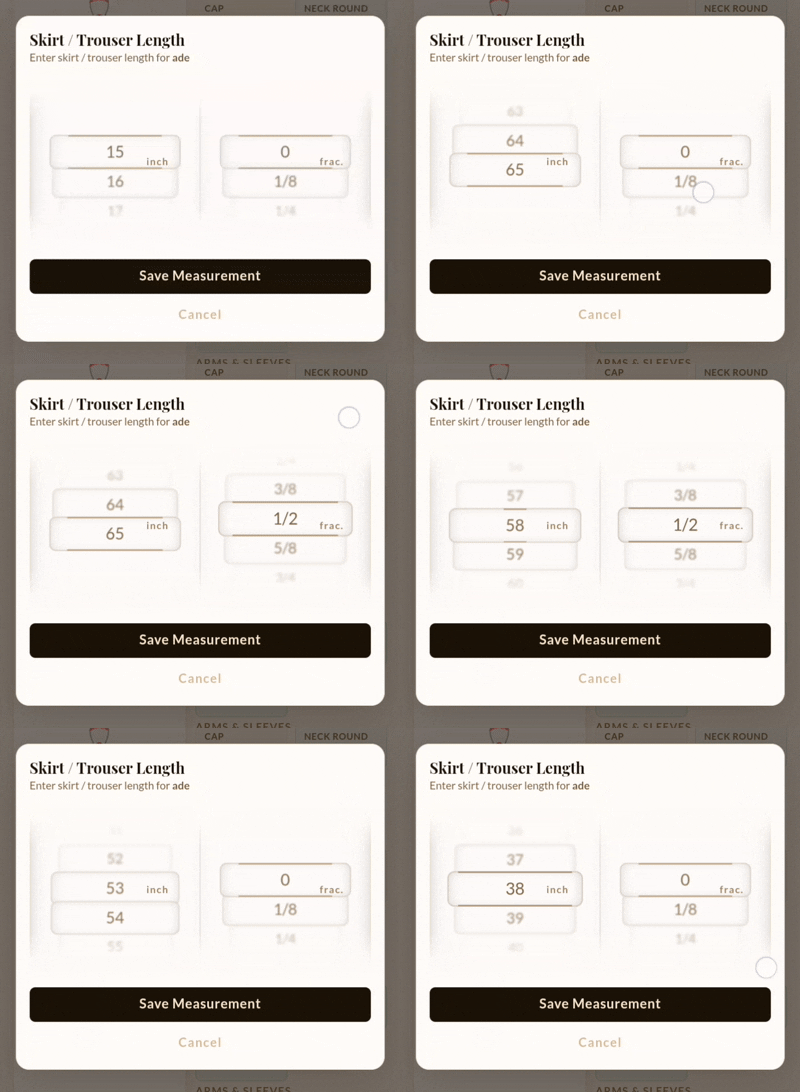
This layout allows the user to quickly swipe their thumb up or down to lock in a measurement. It feels like spinning a real dial rather than doing data entry. The component handles virtualization internally, ensuring that even with dozens of items, the DOM remains lightweight and the scroll animation stays buttery smooth.
Context-Aware Anatomical Validation
To prevent the "1000-inch sleeve" problem, the scroll wheel dynamically restricts its options based on what specific body part is being measured. If a tailor is measuring a neck, the dial literally cannot scroll past 25 inches.
// Conceptual mapping of anatomy to UI constraints
private (int min, int max) GetAnatomicalRange(string bodyPart)
{
    if (bodyPart.Contains("neck"))
    {
        return (10, 25);
    }
    else if (bodyPart.Contains("waist"))
    {
        return (20, 55);
    }
    // ... maps to over a dozen other specific body regions ...
    else
    {
        return (1, 80); // Global safety fallback
    }
}
These ranges aren't just validation rules that yell at the user after they click "Submit" (the traditional web development way). They actively define the bounds of the WheelPicker data source. It is literally impossible to input an invalid measurement because the UI simply doesn't render those numbers.
The Smart Default Engine
We also added a smart default engine to make the scrolling even faster. When the measurement screen opens for a "Waist" input, the dial does not start at zero. Starting at zero would force the tailor to scroll thirty or forty times to reach a normal adult measurement.
Instead, it snaps immediately to 32 as a highly logical starting point. This means most data entries only require a tiny, satisfying flick of the thumb to reach the exact number.
public void InitializeScrollWheel(string bodyPart)
{
    // 1. Fetch the exact physical limits for this measurement
    var (min, max) = GetAnatomicalRange(bodyPart);

    // 2. Generate only valid numbers (e.g. 20 to 55 for a waist)
    ScrollWheelItems = Enumerable.Range(min, max - min + 1).ToList();

    // 3. Apply logic to start the wheel at the most likely measurement
    if (!HasPreviousMeasurement)
    {
        SelectedValue = CalculateSmartDefault(min, max);
    }
}
The Innovation: Domain-Driven UX
The core innovation of ZikFash is Domain-Driven UX. We actively stopped treating tailoring data like generic database fields. By building a 3D scroll wheel, we successfully translated the physical action of sliding a tape measure into a digital swipe.
Furthermore, by baking hard anatomical limits directly into the UI layer, we eliminated the possibility of catastrophic typos. The tailor does not need to type, and they do not need to worry if they accidentally hit an extra zero on a keypad. The software simply does not allow reality-breaking measurements to exist.
This level of empathy in design didn't happen in a vacuum. Latifah, who designs the UI/UX with me, has also worked as a tailor. Because of her hands-on experience, a lot of the pushback on the initial scroll wheel designs came from her just trying it out in a simulated workspace and telling me when it felt merely clever instead of actually usable. Her insights were critical in ensuring the digital tool respected the physical workflow.
Welcome to ZikFash
I keep coming back to something my mom's notebook did that no app I tested could do: it never argued with her. It just held whatever she gave it (a rushed number, a smudged fraction, a name in the margin) and got out of the way.
That is the bar. Not "smarter than a notebook." Just as unobtrusive, minus the tea stains.
ZikFash isn't finished proving it can hit that bar. But the scroll wheel and the anatomical limits are the first real test of a bet we are making: that the right move isn't to make tailoring more digital, it is to make digital more tailoring-shaped.
If that sounds like a small distinction, it hasn't felt small to build.
Curious to see how we're changing the game for fashion creators? Check out the ZikFash Landing Page to learn more.